
If you use Calendrz to mirror your availability across calendars, we have great news: you can now manage your mirroring settings without ever leaving your browser. The Calendrz Chrome Extension puts your most-used Calendrz features right in your toolbar — one click away, any time.
What Does It Do?
The Calendrz Chrome Extension gives you a compact popup panel that connects directly to your Calendrz account. Instead of navigating to the web app every time you want to check your status or trigger a sync, just click the Calendrz icon in your Chrome toolbar and you’re in.
Features at a Glance
Sign In with Google
The extension uses the same Google sign-in you already use with Calendrz. No new accounts, no extra passwords. Sign in once and you’re good to go.
Profile Overview
See your name, email, avatar, and which connected account you’re currently logged in as — all at the top of the popup. It’s a quick way to confirm you’re working with the right account.
Account Status at a Glance
The status panel shows how many accounts you have connected (and the maximum allowed by your subscription tier). A colour-coded indicator tells you instantly whether everything is running smoothly or if any account needs your attention:
- Green — all operational, nothing to worry about
- Amber — one or more accounts need attention
Mirroring Preferences
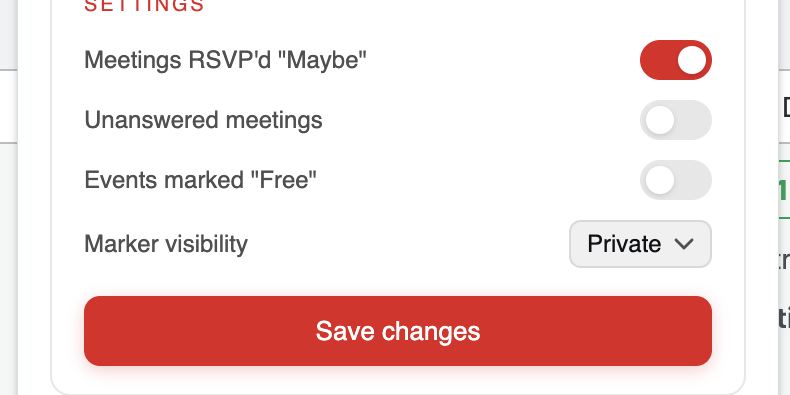
Depending on your subscription tier, you can view and edit your mirroring settings directly from the extension. Available options include:
- Whether to import meetings you’ve RSVP’d as “Maybe”
- Whether to include unanswered (unacknowledged) meetings
- Whether to mirror events marked as “Free”
- Marker visibility — choose between Public and Private
Change a setting, hit Save changes, and you’re done — no need to open the full web app.
One-Click Manual Mirroring
Need your calendars synced right now? If your tier supports manual mirroring, just click the “Mirror my calendars” button and your availability will start syncing immediately.
MCP Server for AI Assistants
The extension also links you to information about Calendrz’s MCP server, which lets AI assistants like Claude and ChatGPT interact with your calendar data. It’s a quick way to discover what’s possible with Calendrz and AI.
Quick Access to the Web App
When you do need the full Calendrz experience, the extension includes a direct link to open the web app in a new tab.
Privacy and Security
The extension is built with Chrome’s latest Manifest V3 standard, which enforces stricter security and performance requirements. Importantly, no tokens or credentials are ever stored by the extension. It relies entirely on the Calendrz web app’s session-based authentication — the same secure session you establish when you sign in through the browser. Your data stays between you and Calendrz.
How to Install
Installing the extension takes just a few seconds:
- Visit the Calendrz Chrome Extension page on the Chrome Web Store
- Click “Add to Chrome”
- The Calendrz icon will appear in your toolbar — click it to get started
The extension is completely free and works with any Calendrz account, regardless of your subscription tier. The features available in the popup simply reflect what your tier supports.
Give It a Try
If you’re already using Calendrz, the Chrome extension is a no-brainer — it saves you time and keeps your mirroring controls within arm’s reach. And if you haven’t tried Calendrz yet, head over to calendrz.com to learn how availability mirroring can simplify your multi-calendar life.